How to Verify Your Google Business Profile Quickly in 2026
If you run a local business, your online visibility can decide how many calls you get this week. When someone searches for a nearby service, they usually click on one of the top results that show up on Google Maps. That listing comes from your Google Business listing, and if it is not verified, it will not perform the way it should.
For businesses investing in Digital Marketing or working with local SEO services, verification is one of the first and most important steps.
Let’s walk through this guide and learn how to verify your google business profile quickly in 2026 and avoid the common mistakes that might obstruct you in verification.
What Is a Google Business Profile?
A Google Business Profile is the information panel that appears when someone searches for your business name or related services in your area. It shows your address, phone number, website, reviews, working hours, and more.
It used to be called as ‘Google My Business’, but now it is fully integrated into Google Search and Google Maps. Managing it is simple, but Google business profile verification is required before you get full control.
Without verification:
- You cannot reply to reviews.
- You cannot edit important details reliably.
- Your visibility may be limited.
- Customers may see incorrect information.
If you are serious about google business search engine optimization, verification is non-negotiable.
Why Verification Matters for Local SEO
When someone searches for “dentist near me” or “cafe in Khurbura,” Google shows three map results first.
A verified profile:
- Builds trust with Google.
- Improves your chances of ranking in local results.
- Allows you to post updates and offers.
- Improves visibility in local maps/ results
- Strengthens your overall Google Business listing authority.
For businesses working with a local SEO company or investing in local SEO services delhi, profile verification is often completed in the first week of onboarding because it directly affects results.
Step by Step: How to Verify Your Google Business Profile in 2026
1. Sign in to the Correct Google Account
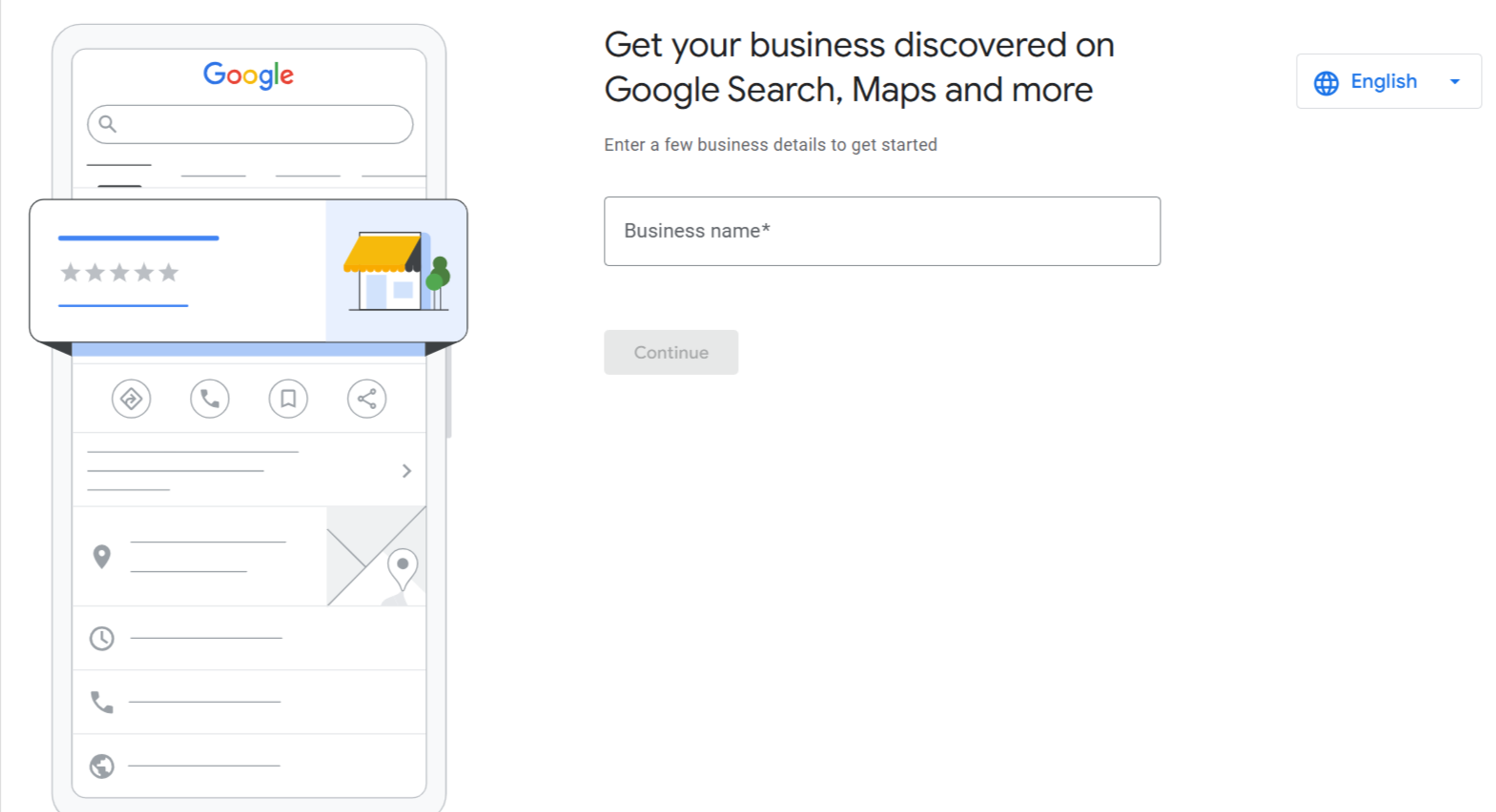
- Go to Google Search and type your business name. If it already exists, you may see an option that says “Own this business?” Click it.
- If your business does not exist yet, create a new profile by searching “add my business”.
- Make sure you use the email address you plan to manage long term. Many businesses lose access later because the profile was created using a former employee’s account.
2. Enter Accurate Business Details
Before verification, you must enter:
- Official business name
- Correct address
- Phone number
- Business category
- Website
Your business name should match your legal or real-world signage. Do not add extra keywords to the name.
Choosing the correct category is important for google business search engine optimization. If you are a bakery, select “Bakery,” not “Food Store” unless that fits better.
3. Select Your Verification Method
Google typically offers one or more of these options:
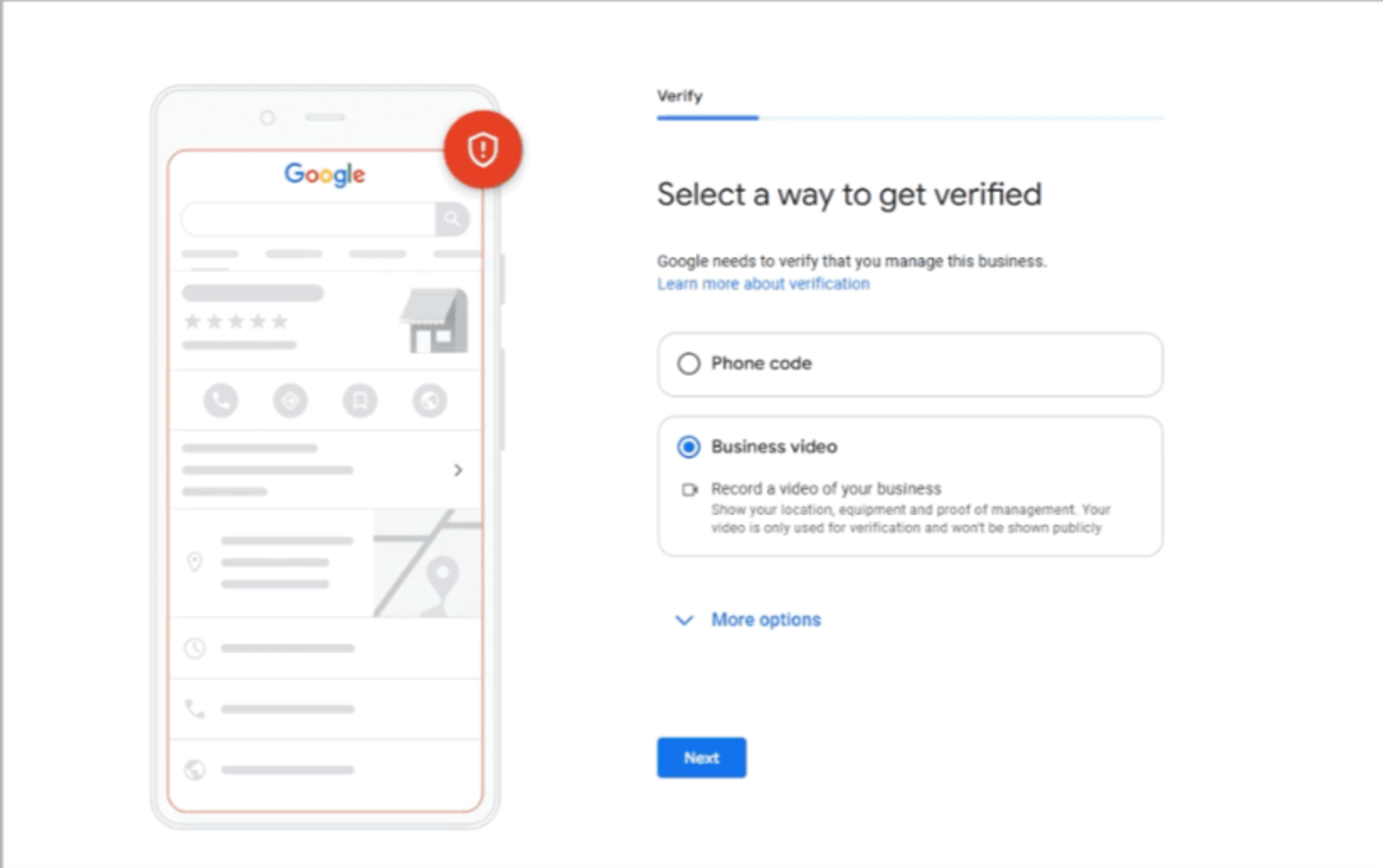
Video Verification
This has become one of the fastest methods. You may need to record a short video showing:
- Your storefront signage
- Inside workspace
- Proof that you manage the location
Follow all the instructions carefully as the video is reviewed by Google’s team.
Phone or Email Verification
Some businesses receive instant verification via a code sent to their registered phone number or email.
Postcard Verification
Google sends a physical postcard with a code to your business address. This can take 5 to 14 days depending on location.
4. Enter the Verification Code
If you receive a code via postcard, phone, or email, log back into your profile and enter the code exactly as shown. Do not delay, codes usually expire within 30 days.
Once accepted, your Google business profile verification is complete.
How to Speed Up the Verification Process?
If you want verification done quickly, here are practical tips that actually help:
Keep Your Information Consistent
Your business name, address, and phone number should match your website and social media pages.
Avoid Using Virtual Offices
Google is strict about fake locations. If you use a shared workspace, make sure you have clear signage and can prove you operate there regularly.
Prepare for Video in Advance
If you are likely to get video verification:
- Make sure your signage is clearly visible.
- Keep business documents ready.
- Record in one continuous clip as instructed.
Do Not Create Duplicate Listings
Multiple listings for the same business cause confusion and can block verification. Search your business name on Google Maps first and claim the existing listing if it is already there.
Many businesses working with best SEO services avoid these mistakes because professionals check for duplicates before creating or claiming a profile.
Common Reasons Verification Gets Rejected
Even bonafide businesses sometimes face rejection. Here are common reasons:
- Mismatch between business name and signage.
- Incomplete video.
- Incorrect address.
- Suspicious keyword stuffing in the name.
- Using a residential address without proper setup.
Review the feedback carefully and resubmit with corrections.
What is the next step after Verification?
Verification is just the beginning. To get real value from your Google Business listing, you need to optimize it.
- Add High Quality Photos
- Write a Clear Business Description
- Collect Genuine Reviews
- Post Regular Updates
How Verification Supports Long Term Growth
A verified profile improves your chances of appearing in local search results.
When customers see:
- A verified badge
- Positive reviews
- Updated business hours
- Real photos
They feel more confident calling or visiting.
For businesses targeting a specific region, such as those looking for local SEO services delhi, verification forms the base of the entire local strategy.
Conclusion
Verifying your Google Business Profile is simple. Accurate information, proper documentation, and following Google’s instructions carefully will help you complete Google business profile verification quickly.
Once verified, treat your profile as a living asset. Update it regularly. Respond to customers. Add photos. Share news. This is not just a formality. It is one of the strongest tools for local visibility.
If your business depends on local customers, your Google Business listing is often the first impression people get. Make sure it is verified, optimized, and actively managed. That single step can directly impact calls, footfall, and long-term growth.